Info Links

info links ads

Infolinks InText

(C) EZone Software Inc. Powered by Blogger.

Make Money

ADS

Showing posts with label Windows App. Show all posts

Connectify Hotspot Pro 3.7.1.25486

Friday, 21 June 2013

Connectify Hotspot

Share your Internet connection with friends and other devices



  • hare Wi-Fi from 3G/4G Networks – Connectify Hotspot PRO supports 
  • sharing Internet from 3G/4G cards in addition to a wide variety of other USB cards and dongles.
  • Unlimited Hotspot Uptime – No time restrictions, run your Connectify Hotspot 24/7.
  • Drag & Drop File Transfers – Easily share files of any size, directly to both devices connected to your hotspot, and to other Connectify Hotspot users on the same network.
  • AutoInternet Selection – Automatically configure your hotspot's Internet sharing settings.
  • Fully Customizable SSID – Name your hotspot whatever you want! (Hotspot Lite requires your hotspot name to start with 'Connectify-')
  • Dispatch Integration - Share your Super-Fast Dispatch Connection with Connectify Hotspot PRO.
Password: ezonesoft

Ultra Iso Portable

Saturday, 28 April 2012

UltraISO


Handle CD and DVD Images with Ease!


Duplicate Disc to CD/DVD Image
Build Files/Folders to One ISO File
Organize and Manage Efficiently
Edit and Convert ISO File in Many Format
Make Bootable CD/DVDs
Create/Edit Audio CD Image
 
 
     Along with the large capacity hard disk popularity,  people were already used to copying compact discs to CD/DVD image files, generally used  is the famous ISO 9660 international standards format, therefore CD/DVD image files are called ISO files. Because the ISO file retained complete data information of the compact disc (including compact disc boot information), you were allowed the convenience to use commonly used CD/DVD burning software (for example Nero-Burning ROM ) to record the disc with your CD-R/RW or DVD-R/RW over and over forever, it can also be used directly through Virtual CD/DVD-ROM drive software (for example Daemon-Tools ) .
     UltraISO  is an ISO CD/DVD image file creating/editing/converting tool and a bootable CD/DVD maker , it can directly edit the CD/DVD image file and extract files and folders from it, as well as directly make ISO files from your CD/DVD-ROM or  hard disk. At the same time, you can maintain the ISO bootable information, thus creating your own bootable CD/DVDs. You now have the power to make and  edit your own ISO files, and then burn them to CD/DVD for your own needs.

     UltraISO is in sole possession of the intellectualized ISO document format analyzer, it can process at the present time almost all types of image files, including  ISO and BIN, it may even support new image files which are yet to be created. UltraISO can open these image files, directly extract files and folders, edit it and convert other image files to the standard ISO format.
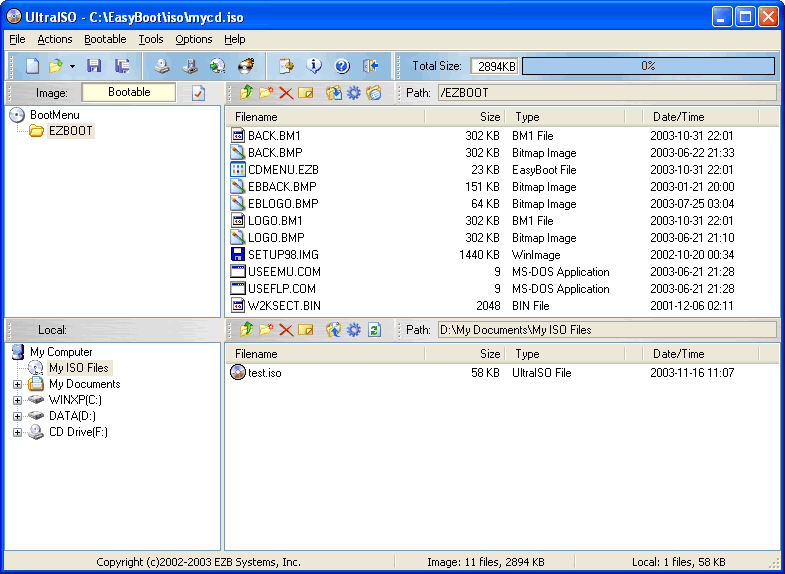
    UltraISO uses the double window unification user contact interface, you have the choice to only use the quick buttons and/or the mouse Drag & Drops, you can handle any CD/DVD image file easily.


  System Requirement  
 
  • Windows 7/2008/Vista/2003/XP (32bit and 64bit), Windows 2000, ME, 98SE, 98, or Windows NT4.0 SP6a+ operating system .
  • Intel Pentium 166MHz or above.
  • 64MB memory.
  • At least 10MB free hard disk space .
  • CD-ROM, CD-R/RW, DVD-ROM, the DVD-R/RW driver (copy compact disc image needs).
  • Mouse.
 
  Main Features  
 
  • Can directly edit the ISO image file.
  • Can directly extract files and folders from ISO image file
  • Can add / delete /create new directory /rename ISO file image content.
  • Can make ISO file from hard disk document.
  • Can create CD/DVD image from CD/DVD-ROM, maintain bootable information.
  • Can process the compact disc boot information, you can directly add/remove/extract boot image of the ISO image.
  • Supports nearly all known CD/DVD image file formats (.ISO, .BIN, .IMG, .CIF, .NRG, .MDS, .CCD, .BWI, .ISZ, .DMG, .DAA, .UIF, .HFS and so on) , and can convert them to the industry standard and widely supported ISO image format.
  • May directly set the file/folder to hidden attribute
  • Supports ISO 9660 Level1/2/3 and Joliet extension
  • Automatically optimizes the ISO image file structure, saves the disc space.
  • Supports the shell document type integration, Open Image files through double clicking them or the Right Click menu of the mouse with the open dialog.
  • The double window user interface is extremely convenient to use.
  • There are rich add-on tools, you can create ALL in 1 bootable compact discs, CD/DVD image file management, even the virtual CD/DVD drive , those functions are really powerful. 

     Direct download 

eBoostr PRO v4.0.0554 (x32/x64) | Full Version |

Friday, 16 March 2012


Supports up to 4* devices simultaneously, ensuring that eBoostr can keep up with increasing demands on systems
    Cache file size of up to 4GB on each device (NTFS has no size limit)
No Hardware Upgrades Needed
Launch Favorite Applications Faster
    eBoostr tracks the use of applications on your system and can pre-cache data of the ones most frequently used, this reduces load delays and optimizes performance
    Easy to use drag-and-drop interface allows you to selectively enhance applications on your system as well as prioritize applications enhanced by eBoostr
    Reduced load times and less hard drive access help prolong battery life of laptops and netbooks using eBoostr
Use Hidden RAM
    32 Bit version of Windows 7 cannot use RAM over 3.25 GB
    eBoostr 4 can utilize this RAM in the creation of an intelligent cache, boosting your system's performance
Use Hidden RAM
New and Improved Cache Configuration
    Easy one-step process allows you to configure and manage cache size
    Autoconfiguration Wizard - Intelligent caching system detects all compatible hardware and recommends best settings for your PC
Windows 7 Compatible
    Elimination of UAC notifications for Windows 7 & Vista through smoother cache naming and location handling
    Supports dual-boot and multi-boot configurations
    Capable of pre-caching OS data, reducing time systems need to boot
    Supports Intel TurboMemory (Vista and Windows 7 only)


eBoostr Features at a Glance
No Hardware Upgrades Needed
    eBoostr is compatible with both USB and Non-USB removable storage devices, as well as all "Enhanced for Readyboost"devices

Sponcer

Social Icons

Featured Posts

Asif
 

Status

Catagories

Search This Blog

Followers

Tags

Visitors

free counters